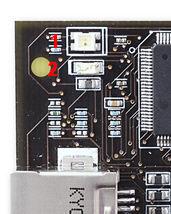
Two LEDs show the status of the Atmel AVR Dragon. Check the Troubleshooting Guide to check for solutions if there are any errors.
| LED # | Color | Description |
|---|---|---|
| 2 | Green | Indicates USB traffic |
| 1 | Red | Idle, not connected to the software front-end |
| Dark | Idle, connected to the software front-end | |
| Green | Data Transfer | |
| Yellow | Firmware Upgrade or Initialization |