Figure 1. CAN Autobaud Flowchart
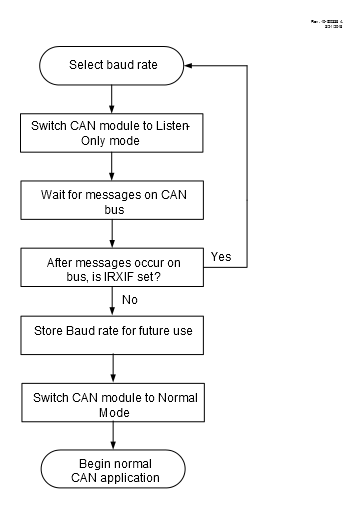
With the previously mentioned features of the CAN module, the following automatic bit rate detection algorithm can be performed.
- 1.Select a starting baud rate. This can be determined in a number of ways, which are application dependent. Some recommendations for starting baud rate include: the most commonly used baud rate for CAN buses that the application is connecting to, the highest possible baud rate among CAN buses that the application is connecting to, or the baud rate of the CAN bus that the application was most recently connected to.
- 2.In addition, have the remaining possible baud rate selections stored in nonvolatile memory, either in code or EEPROM.
- 3.Set up the masks and filters to accept all messages.
- 4.Switch the CAN module into Listen-Only mode (CANCON<7:5>=0b011)
- 5.Either trigger a message on the bus or wait long enough for at least one message to occur under normal bus operation
- 6.Either using interrupts or polling, check the CAN Bus Message Error Interrupt Flag IRXIF (PIR5<7>)
- 7.If the IRXIF flag is set, clear it, switch the CAN module into configuration mode(CANCON7:5=0b100) and change the baud rate to the next possible baud rate selection, then return to step 4
- 8.If the IRXIF flag is not set, check the receive buffer interrupt flags. If they are set, then clear them and continue on to the application code. Optionally, store the current baud rate in nonvolatile memory for use as the starting baud rate on further power-ups to streamline the autobaud sequence.