The Kit/Transceiver Properties view allows you to view kit/transceiver configuration options to configure the PER Test Configuration parameters, Transceiver Configuration Options and to set the selected state.
Configuration options appears in the kit/transceiver properties view, only when the kit is connected as single mode or paired mode.
Kit Configuration Options
To view kit configuration options; in the Kit/Transceiver Properties view, connect the port.
And, perform one of the operations - Initiate Peer Search (or) Continue as Single Node. Once the mode is set, the kit/transceiver configuration options appear in the left hand side view.
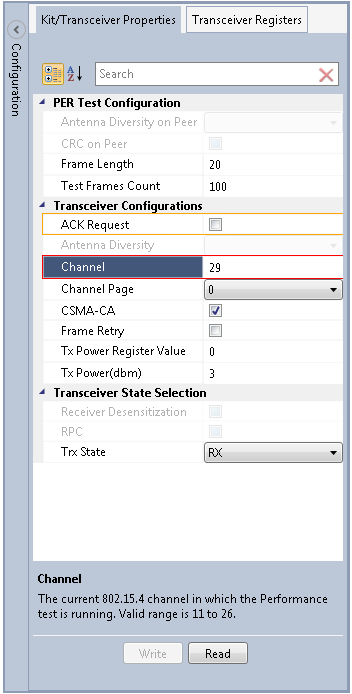
- The configuration options are available for both the Host node and Remote node. Selecting the Host node shows the configuration parameters for Host node. Selecting the Remote node shows the configuration parameters of the Remote node.
- The list of configuration parameters shown varies based on the transceiver in the kit.
For example; the following kit configuration options might be available:
| Configuration parameters | Default value | Comments | ||||||||||||||||||||||||||||
|---|---|---|---|---|---|---|---|---|---|---|---|---|---|---|---|---|---|---|---|---|---|---|---|---|---|---|---|---|---|---|
| Channel | 20 |
The current 802.15.4 channel where the performance test is being runned. Valid range is 11 to 26. |
||||||||||||||||||||||||||||
| Channel page | 0 |
Current page of the performance test. Allowed pages are:
|
||||||||||||||||||||||||||||
| Channel page | 0 |
The multi-core transceivers (e.g., RF215) also supports Channel
Page 9. The following tables show the configuration options available for
Channel Page 9:
|
||||||||||||||||||||||||||||
| Channel page | 0 |
|
||||||||||||||||||||||||||||
| TX Power |
3dBm (depends on transceiver) |
Transceiver transmit power value in dBm | ||||||||||||||||||||||||||||
| TX Power Reg | Transceiver transmit power register value | |||||||||||||||||||||||||||||
| Test frame count | 100 | Set number of frames to transmit | ||||||||||||||||||||||||||||
| Frame length | 20 | Set length of frames | ||||||||||||||||||||||||||||
| Peer CRC | Disabled |
Enable/Disable manual CRC for frames to count packets received with wrong CRC. If enabled then Auto CRC is going to be disable. |
||||||||||||||||||||||||||||
| Antenna diversity | Enabled |
Selects transceiver antenna diversity. Selections are:
|
||||||||||||||||||||||||||||
| Peer Antenna diversity | Enabled |
Selects peer antenna diversity. Selections are:
|
||||||||||||||||||||||||||||
| TRX State | Trx_OFF |
Enables measurements of power consumption in various transceiver
states. Selections are:
|
||||||||||||||||||||||||||||
| Desensitivity | Disabled |
Sets if receiver should be desensitized. This would lead to that frames with a lower RSSI than the threshold are discarded. |
||||||||||||||||||||||||||||
| RPC | Enable | Set the Reduced Power Consumption mode | ||||||||||||||||||||||||||||
| CSMA | Enabled | Sets Carrier Multiple Access/Collision Avoidance | ||||||||||||||||||||||||||||
| Frame retry | Disabled | Set frame retries | ||||||||||||||||||||||||||||
| ACK request | Disabled | Sets ACK request |