Atmel ICE can be used to stream data from user board. The following section explains the connection specifics.
In order to connect user specific board to QTouch Analyzer, data must be streamed from user board. This involves connecting Atmel ICE to User board and setting up the user board project.
Refer to the connection table below and connect the mini squid cable from AVR header to
user board. 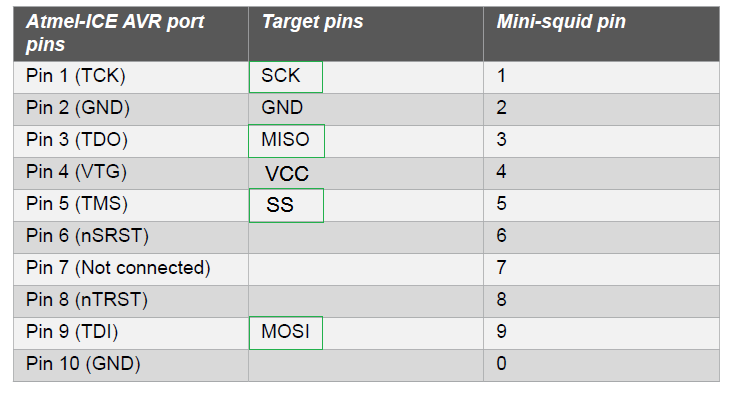
The pins that are highlighted (SCK,MISO,SS and MOSI) can be chosen in the debug interface selection pane, in the project builder wizard.
Once the connections are made correctly and debug interface setup is also done in the project, data can be streamed and visualized in QTouch Analyzer.
Atmel ICE would be listed in QTouch Analyzer as QDEBUG_DGI and user can connect and visualize data.