The Sensor XY Line Mapping Page allows the user to specify the QTouch library variant to use. When using the QMatrix touch technology channels are connected to an X-Line and a Y-Line. For sensors consisting of several channels, wheels and sliders, all corresponding channels must be connected to the same Y-Line and different X-Lines. Based on the current design the wizard knows how many channels must be supported and will disable choices that will not support the design. Usually the user would want to select the variant providing the best fit regarding number of channels, this means selecting the variant supporting the least amount of channels while still supporting a number of channels equal to or higher than the actual number of channels.
The next step is to decide the ratio of X-Lines to Y-Lines for the supported number of channels. The ratio between X- and Y-lines is given as X-lines x Y-lines. E.g. a library supporting 8 X-lines and 2 Y-Lines will be listed as 8x2. As a multi-channel sensor such as a wheel needs to have all channels connected to the same Y-line and these channels must have separate X-lines, the minimum number of X-lines is given by the maximum number of channels any sensor uses. E.g. if a slider is configured to use 5 channels, then a library variant supporting 5 or more X-lines must be selected. An 8x2 (8 X-lines, 2 Y-lines) variant would do the job, but a 4x4 variant would not (only 4 X-lines, need at least 5).
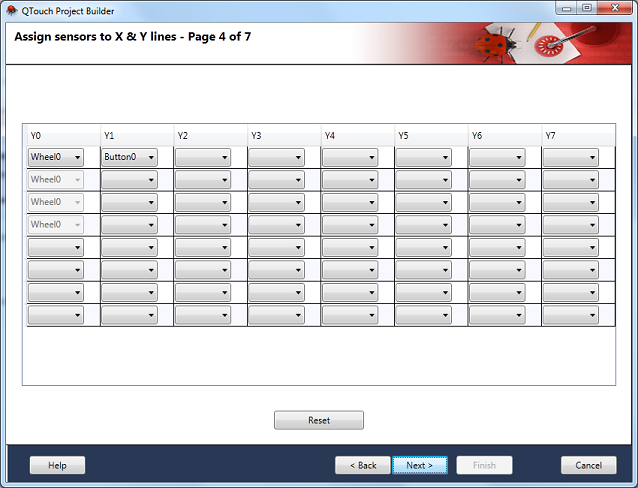
Rules/Guidelines
-
All the sensors should be assigned
-
There cannot be empty selection in between two sensors in a column
-
A column cannot be empty in between two columns that has been assigned with sensors
-
All the channels for the sensor should have been assigned
-
Same sensor should not be selected twice
-
All the channels of a Wheel and Slider should be assigned in the same X Line