Add RTC drivers to the project in Atmel | START with the following steps:
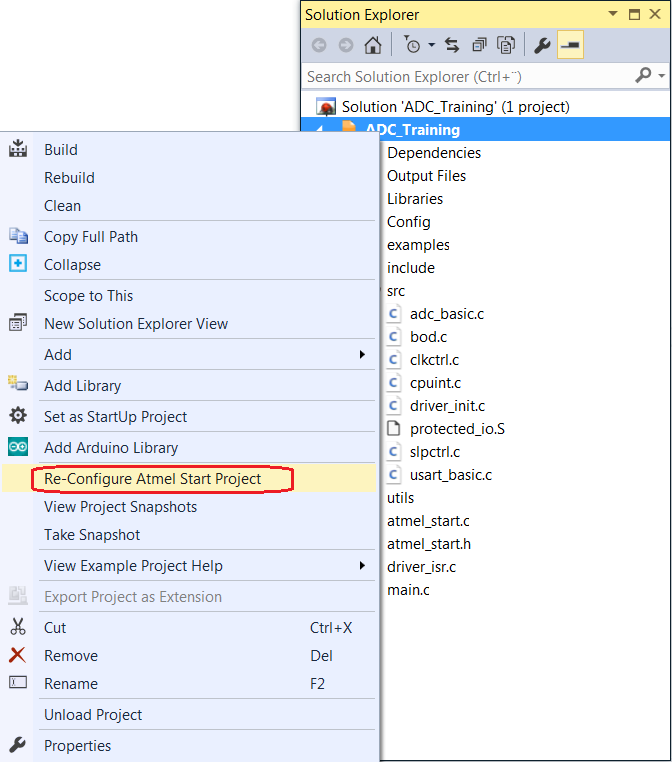
- Select the project by right-clicking the ADC_Training project in the Solution Explorer window from the previous assignment.
- Reconfigure the project by clicking the
Re-Configure Atmel | START Project option in the menu as shown in
Figure 1.Figure 1. Reconfigure Atmel | START
 Info: The Atmel | START window should appear within Atmel Studio.
 - Add the RTC component in Atmel |
START:
- Expand Drivers
from the ADD SOFTWARE COMPONENT window by clicking
 in the Atmel | START window.
 - Select RTC by
clicking
 as shown in Figure 2. Figure 2. Add RTC Component in Atmel | START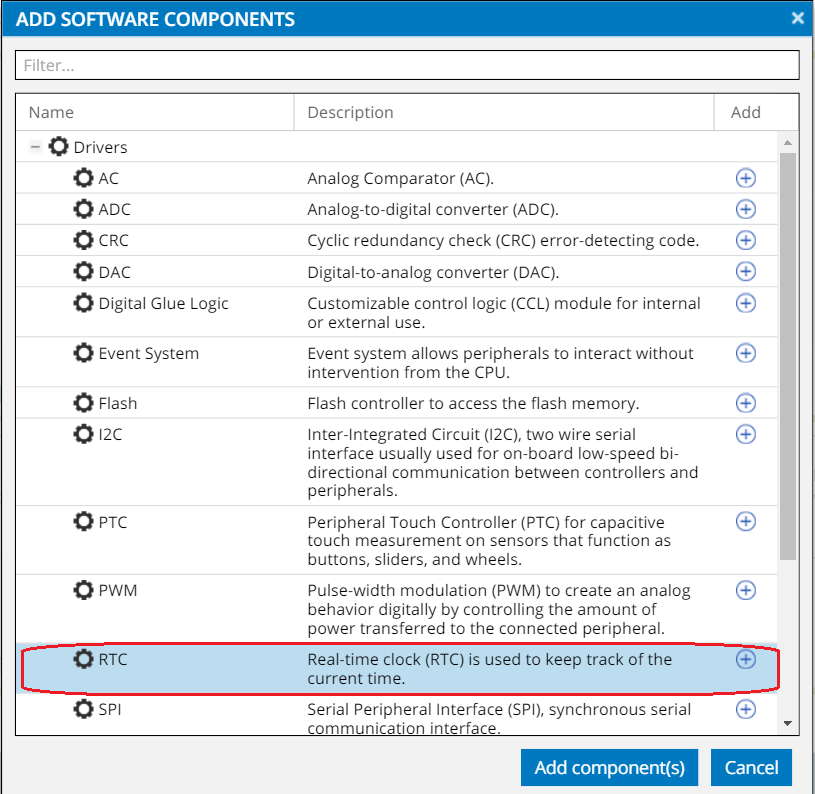
- Add the selected RTC
component by clicking
 .
.
Info: The RTC module will be added to the ADC and Power Optimization project. - Expand Drivers
from the ADD SOFTWARE COMPONENT window by clicking