IAR Embedded Workbench® for AVR® is a proprietary high-efficiency compiler which is not based on GCC. Programming and debugging of Xplained Pro kits are supported in IAR™ Embedded Workbench for AVR using the Atmel-ICE interface. Some initial settings must be set up in the project to get the programming and debugging to work.
The following steps will explain how to get your project ready for programming and debugging:
- Make sure you have opened the project you want to configure. Open the OPTIONS dialog for the project.
- In the category General Options, select the Target tab. Select the device for the project, or, if not listed, the core of the device.
- In the category Debugger, select the Setup tab. Select Atmel-ICE as the driver.
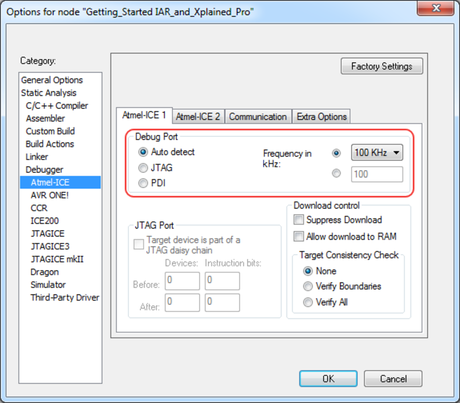
- In the category , select the Atmel-ICE 1 tab. Select UPDI as the interface and optionally select the UPDI frequency.
Info: If the
selection of Debug Port, mentioned in step 4, is grayed out, the interface is
preselected, and the user can skip this configuration step.
Figure 1. Select Target Device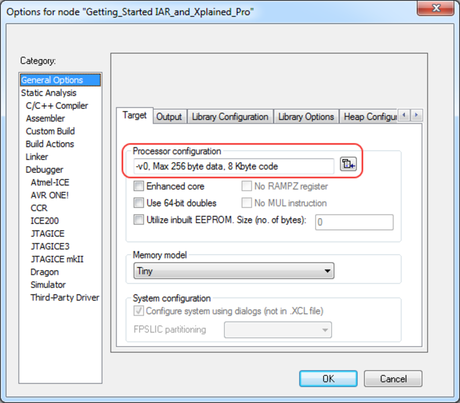
Figure 2. Select Debugger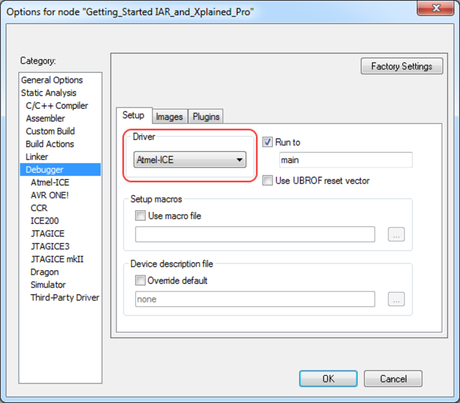
Figure 3. Configure Interface