The test procedure to be followed for demonstrating this application is explained as follows.
- Make sure that the SAM L22 Xplained Pro board is working fine by running the basic project as mentioned in section Creating a Sample Project using SAM L22 of this application note
- Open the ASF project “TAMPER_DETECTION_EXAMPLE.atsln“
- This application includes the
following drivers of ASF
- General Board support (driver)
- Sleep Manager (service)
- Delay Routine (service) (cycle)
- DMAC – Direct Memory Access Controller (driver)
- PORT – GPIO pin function (driver)
- RTC – Real Time Counter (driver) (calendar call back)
- SERCOM – USART Serial Communication (driver) (polled)
- SLCD – Segmented Liquid Crystal Display (driver) (polling)
- Standard serial I/O (stdio) driver
- TCC – Timer Counter for control application (driver) (call back)
- Read While Write EEPROM emulator service (driver)
- Ensure that all the above drivers are present in the ASF wizard of the current project
- Compile the project and make sure that there are no errors and warnings
- Open the Terminal window “Tera-Term”, select the serial port in which the SAM L22 Xplained Pro is connected, and configure the serial port settings as mentioned under the section Terminal Window Setting
- Program the device and run the code
- The firmware initializes the
following configurations
- RWW EEPROM configuration - For enumerating RWW EEPROM section
- RTC calendar configuration - For tracking the time easily from the clock register
- TCC (timer) configuration - For blinking SLCD backlight
- USART configuration - For communication with PC
- SLCD configuration - For display purpose
- Sleep configuration - For enabling the sleep modes
- DMA configuration - For initiating data transfer from register to register
- The display menu will be displayed on the terminal window as shown in the following figure
Figure 1. Display Menu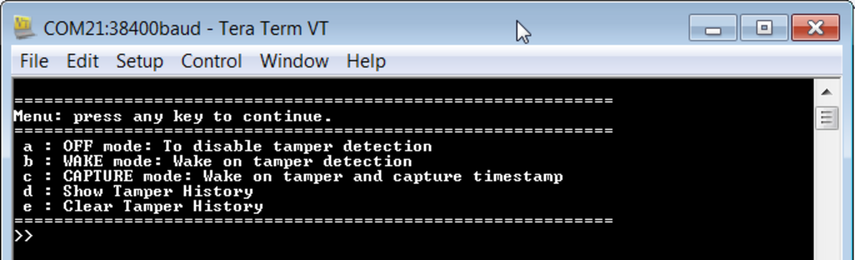
- Enter one of the following characters
to enable the specific mode of tamper or to read the RWW EEPROM contents. The
display menu consists of the following options:
“a”: Disable tamper
“b”: Enable tamper in wake mode
“c”: Enable tamper in capture mode
“d”: Read the contents of RWW memory location
“e”: Clear the contents of RWW memory
When any of the above character is entered, it will be displayed on the terminal window.
The operation under each and every mode is explained as follows.